Profile and Security
Update your personal profile, change your password, and manage sessions
Your account settings live outside any specific company. Here you manage your personal details, security, and login sessions.
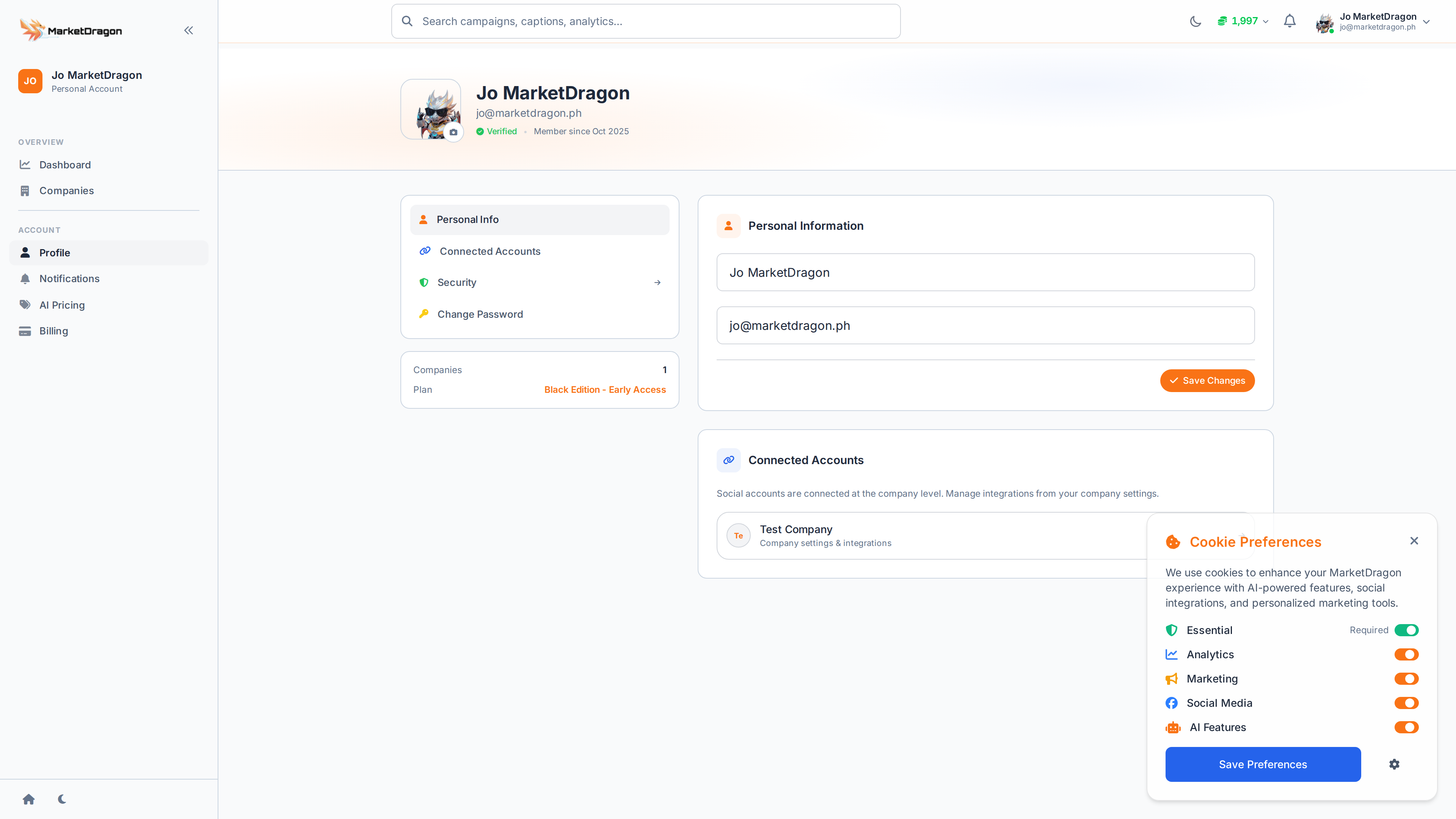
Profile
Access your profile by clicking your avatar in the top-right corner and selecting Profile, or by navigating directly to the Profile page.
What You Can Update
- Name -- Your display name across the platform
- Email -- Your login email address
- Avatar -- Upload a profile picture
Make your changes and click Save to apply.
Security
Navigate to Security from your account menu.
Change Password
- Enter your current password
- Enter your new password
- Confirm the new password
- Click Update Password
Active Sessions
The Security page shows your active login sessions:
- Device type and browser
- IP address
- Last active time
If you see an unfamiliar session, click Revoke to end it immediately.
Companies
Navigate to Companies from your account menu to see all companies you belong to. From here you can:
- Switch between companies
- Create a new company
- Leave a company you no longer need access to
Tip: Use a strong, unique password for your MarketDragon account. If you manage multiple companies, your credentials grant access to all of them.
Next Steps
Signal pending
Video walkthrough not recorded yet
Switch back to Read for the full written guide — it is complete.