AI Video Maker in the Philippines: What to Make, How to Pay
What Filipino creators and small businesses actually make with an AI video maker, how payment works without a card, and where to learn it live.
An AI video maker built for Philippine creators means three things: peso-friendly, local formats (menu videos, Shopee/Lazada product reels, kilig shorts for Facebook Reels), payment by GCash or QR Ph with no auto-charge, and live classes taught in Taglish. MarketDragon covers all four through the AI Director, Spaces, Canvas editor and the video editor.

Most AI video tools are built for a global user and priced in dollars on a card that auto-renews. That's a specific set of assumptions, and a lot of creators and small business owners here don't match any of them. This is what MarketDragon actually offers a Filipino creator: what to make, how the studio works, and how you pay for it.
What people here actually make
Three kinds of videos come up again and again with small brands and solo creators in the Philippines:
- Menu and product videos for a food stall, café or online shop — something that shows the item, not just describes it.
- Product reels built from one photo — a shot you already have becomes a short video ad instead of a static post.
- Kilig shorts — short, story-driven videos in the romantic, slice-of-life register that does well on Facebook Reels.
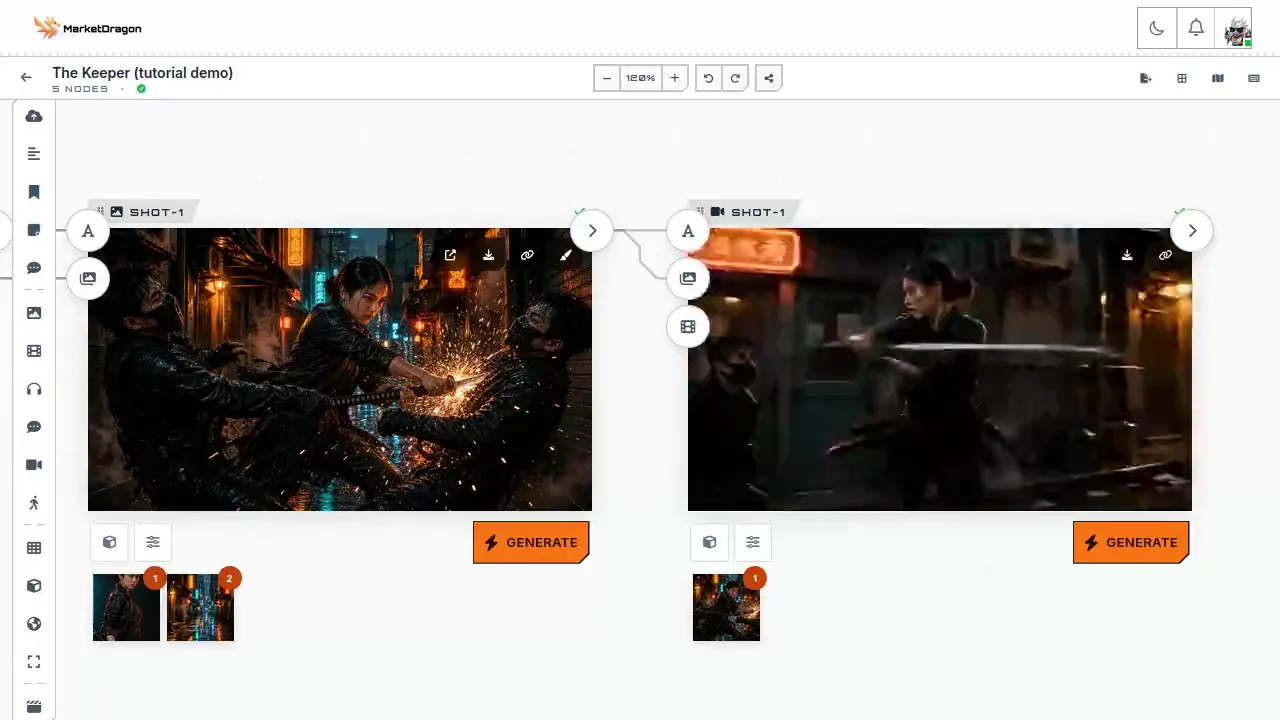
All three run through the same studio: the AI Director plans a story or a shot list from your brief, Spaces boards it out with a wired cast if there are people in it, the Canvas editor handles a still image ad, and the video editor cuts and times the clips. Bloop can then draft the caption, poster and thumbnail for the post itself.
| What you're making | Where you start | What you get |
|---|---|---|
| Menu / product video | Canvas editor, from one photo | a short vertical clip, captioned and timed |
| Shopee / Lazada product reel | Canvas editor, then the video editor | an ad-style reel from an existing listing photo |
| Kilig short | AI Director + Spaces | a multi-shot story with a wired cast, several beats |
None of these need a camera crew or a studio. What they need is a clear brief and a photo, if you have one already.
A menu or product video, from one photo
You don't need a shoot. Upload the product photo you already have — a plate from your carinderia, a Shopee listing shot — and the Canvas editor's AI tools can clean the background, extend the frame, or set it against a new scene before it goes to video. The video editor then adds your captions and cuts it to a short, feed-ready length.
A kilig short, cast and wired
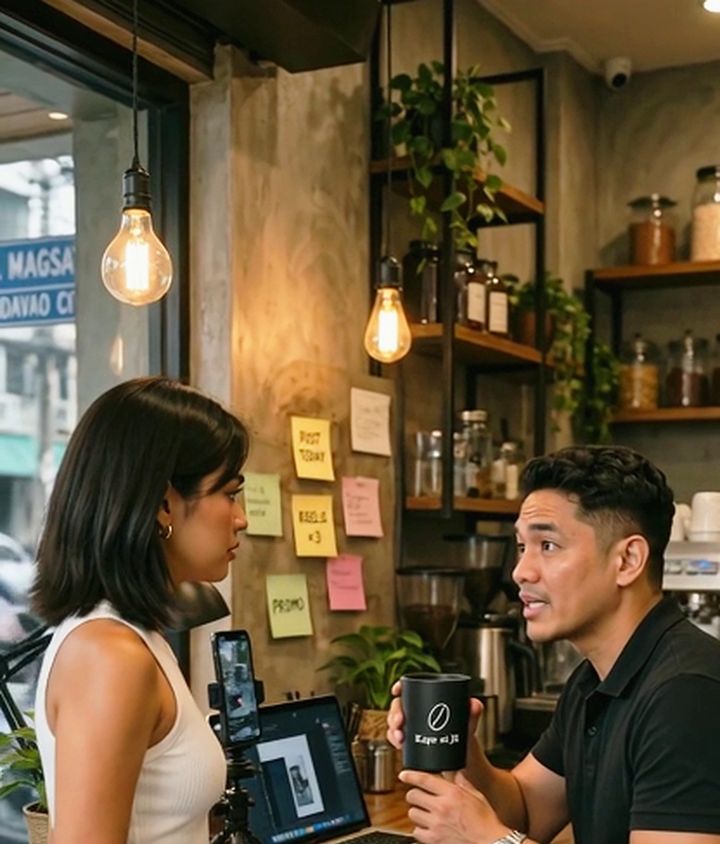
For anything with people and a story — the format that tends to travel furthest on Facebook Reels — Spaces is the tool. Describe the story in one prompt and the AI Director casts the people, places and props, then wires each character into every shot so the same face carries through the whole short. We built one this way ourselves, a 30-second short called "Busy Daw," set in a Davao café, which you can watch on /studio alongside our other real films — see the still below. If you want the mechanics of how the character-wiring works, see Consistent Character AI Video.
How you actually pay
This is the part most AI tools built elsewhere get wrong for this market: a plan here does not have to be a recurring card charge, because for most buyers in the Philippines it can't be. You pay with QR Ph — scan it with any QR Ph wallet or bank app, or pay over the counter at ECPay — or with GCash or InstaPay directly. No card is required; MarketDragon's payment account doesn't carry one yet.
Because none of those rails can charge themselves automatically, a plan here is a one-time payment, not an auto-renewing subscription. Nothing charges your GCash or wallet again on its own — you get a reminder ahead of your renewal date and you choose to pay it, the same way you'd choose to pay a bill. See /pricing for the plans themselves; this post won't put numbers here since those change independently of this guide.
This isn't a claim that no one else takes GCash — several tools already do. It's the plain fact of how paying us actually works, stated so you know before you start, not after a renewal surprises you.
QR Ph itself isn't a MarketDragon feature — it's the Bangko Sentral ng Pilipinas' own national standard (BSP Circular 1055), which is why "any QR Ph wallet or bank app" is a plain description and not a boast. Scan it with whichever app you already have installed; the rail is the same one behind it either way.
Learn it live, in Taglish
If you'd rather be walked through it than read about it, MarketDragon runs live classes on /events — Tuesdays and Fridays at 8 PM, taught in a mix of English and Tagalog, plus a monthly hands-on session in Davao where the work gets made in front of you. No separate app or account to join; the event page has the schedule and the sign-up.
Where this sits next to what's already on your phone
CapCut and Canva already do general-purpose editing, and a lot of creators here already have them installed. MarketDragon isn't trying to replace a quick caption edit — it's for the step before that: turning a brief or a single photo into an actual clip, with a wired cast if the story needs one. On the AI-video-specifically side, AIVideo.ph is the other Philippine-based option we're aware of. We haven't tested it ourselves, so we won't compare features against it directly — worth a look if you're shopping around, and judge for yourself which fits your workflow.
Getting started
- Sign up — no card, no GCash charge yet. Building a board or a design costs nothing.
- Bring a photo if you have one (your menu item, your Shopee listing), or describe the story you want in one prompt.
- Let the AI Director or the Canvas editor lay out the shots, then pick which ones you actually want to render — that's the only step that spends credits, and the cost shows before you press Generate.
Ready to try it on your own product photo or story? A copy-ready starting prompt is below.
A small carinderia counter at golden hour, steam rising off a pot of sinigang, the owner ladling a bowl for camera, warm handheld push-in, natural light through a jeepney-lined street outside. Taglish voiceover: "Todo lutong bahay, todo sarap." 9:16 vertical, for a Facebook Reel.
Frequently asked questions
Do I need a credit card to use MarketDragon?
No. Plans are paid by QR Ph, GCash, InstaPay or over the counter at ECPay. No card option exists on the account yet.
Will my GCash or wallet get charged automatically each month?
No. None of those rails support automatic recurring billing, so a plan is a one-time payment you renew yourself when you choose to, not a subscription that charges itself.
Paano gumawa ng AI video para sa maliit na negosyo?
I-describe ang produkto o kwento sa isang prompt, ipaplano ng AI Director ang mga shot, at ikaw ang pipili kung alin ang i-re-render. Walang kailangang kamera o studio setup.
May libreng klase ba sa Taglish?
Meron kaming live classes tuwing Martes at Biyernes, 8 PM, halong Ingles at Tagalog — tingnan ang /events para sa schedule.
What if my story needs a consistent character across shots?
Spaces wires one character card into every shot instead of redescribing them each time — see Consistent Character AI Video for how that works.
Keep reading
Same shelfBloop Studio Cloud Models: Render Without a Strong GPU by Signing In
How to use bloop's cloud models inside the free Bloop Studio app: who needs them, what the account adds, how free and paid plans differ, and how to mix cloud with your own GPU.
Run AI Video on Your Own GPU Without Learning ComfyUI
How Bloop Studio sets up ComfyUI and the models for you with one button, what it checks on your graphics card, and which cards can render pictures and video with sound.
Plan an AI Film as Cards: How the Bloop Studio Story Board Works
How the Bloop Studio board works: six card types, wires that make the story read left to right, first and last frames, and one cast and location wired into every shot.