Consistent Character AI Video: Keep the Same Face in Every Shot
How to stop an AI character from drifting shot to shot: wire one cast card into every scene instead of re-describing the person each time. Real board, real screenshots.
To keep an AI video character consistent, don't re-describe them in every prompt — wire one reference picture (a cast card) into every shot instead, so each render reads the same face, hair and outfit. Spaces does this by connecting one cast card to every shot that character appears in.

A character generated fresh in every shot is not the same character twice. Ask five separate renders for "a woman, late 20s, shoulder-length dark hair" and you get five different faces, because the model has nothing to hold onto except the words — and words leave out almost everything a face actually is.
The fix isn't a longer description. It's not re-describing the person at all after the first time. Wire one picture of them into every shot instead, and let that picture carry the face, hair and outfit forward.
This matters most for creators here in the Philippines making anything story-driven for Facebook Reels — a kilig short, a carinderia vlog series, a recurring host for a Shopee or Lazada product page. If the host or lead looks like a different person in every clip, the series doesn't feel like a series.
Why characters drift shot to shot
Most AI video and image tools generate each request independently. Type the same character description into three separate prompts and the model reads words, not a person — "brown eyes" and "confident smile" don't pin down enough to reproduce a specific face. Small differences in phrasing, or no difference at all, still land on different results, because a text prompt is a description, not a photograph.
Reference images fix this, but only if the same reference reaches every shot. Copy-pasting an image URL into five separate prompts by hand is exactly the kind of step that gets skipped once you're seven shots into a board.
Wire one character into every shot
In Spaces, a character isn't retyped per shot — it's a card on the board, called a cast card: one picture, one name, one written description. You wire that card's picture into every shot that needs that person, the same way you'd patch a cable on a mixing desk. Every shot downstream of that wire reads the same reference image, so the model isn't guessing at a new face each time — it's working from the one you already approved.
This is the same mechanism the AI Director uses when it plans a board for you: when it casts someone, it wires their card into every scene they appear in, not just the first one. The clip below shows a cast card wired into a shot card on a real board.
A real board: Busy Daw
We built a short film this way to test it end to end — a 30-second vertical story called "Busy Daw", made entirely on one Spaces board (workspace board "BC Daw"). The lead character, Czarina, has one cast card with a detailed written description and a rendered reference picture. That single card is wired into every beat she appears in: the bedroom scene, the phone close-up, the café confrontation, the final scene on the sofa. Four different shots, different angles, different lighting — one wired reference behind all of them.
You can watch the finished film on /studio, where we show real films made in MarketDragon. The two stills below are two different beats of that same film — same wired character, different scene, different light.
Outfits without losing the face
A character doesn't always wear the same thing. Spaces handles this with a separate outfit card tied back to the person — for example a "Maya at school" card sitting beside the main "Maya" card. The outfit card is drawn from Maya's own picture, so the face stays hers; only the clothes change. Each shot then uses whichever outfit card fits that scene, and the outfit card still carries Maya's voice, so dialogue stays attributed to the right person even when she's changed clothes across the board.
Give the face detail that survives a render
A wired reference image does most of the work, but the written description still matters — for the first render of that reference, and for any shot that leans on the words alongside the picture. "Beautiful woman with brown eyes" gives a model almost nothing to lock onto. Specific, unusual details do better: face shape, a particular nose or jaw, hair part, and one small mark that wouldn't be interchangeable with anyone else's — Czarina's card, for example, calls out "a tiny crescent-shaped scar near the right edge of her chin." That's the kind of detail that comes back the same way on a re-render, because it's specific enough that the model can't quietly substitute something else.
Step by step in Spaces
- Cast the character once — either ask the AI Director to cast them as part of planning your board, or add a cast card yourself with a written description and generate its reference picture.
- Approve the picture. This is the reference every later shot will use, so it's worth a second look before you build on it.
- For every shot that includes this character, wire the cast card's picture output into that shot's reference input, instead of typing the description again.
- If the character changes clothes partway through the story, add an outfit
card tied to them (
of: <name>) rather than a whole new character. - Render the shots you actually want — a wired reference doesn't spend credits by itself; generating each shot does.
When you also need a back view
A single front-facing reference is enough for most angles, but a shot from behind the character has nothing to go on if the only picture you gave the model is a front view. If your story needs a shot from behind — walking away, looking over a shoulder — plan for a second reference that shows the back, the same way a live-action production would keep a costume reference sheet from more than one angle.
Frequently asked questions
Does a wired reference guarantee an identical face every time? No. It gives the model the same starting picture on every shot, which removes the biggest source of drift — a fresh guess from text alone. The render itself is still generative, so treat a wired board as consistent by design, not consistent by guarantee. Check each render before you commit to it.
Can I keep a character consistent across image and video shots on the same board? Yes — the wiring works the same way whether the shot downstream is an image node or a video node. Both read the same cast card reference.
What if I want the character to age, or change their hairstyle mid-story? Add a new cast or outfit card for that version of the character rather than editing the original card. That keeps the earlier shots pointing at the earlier look instead of silently changing them too.
Does this work for more than one character in the same shot? Each character gets its own cast card and its own wire into the shot. A shot that stacks several people from a single reference image tends to blur which face belongs to whom — one reference per person per shot works more reliably.
Do I need to know how to storyboard to start? No — describe the story in one prompt and the AI Director casts the people, places and props and wires the board for you. You can still rewire anything by hand afterward.
A wired board is the difference between hoping a character comes back the same and building so that it does. Start a board free and cast your first character.
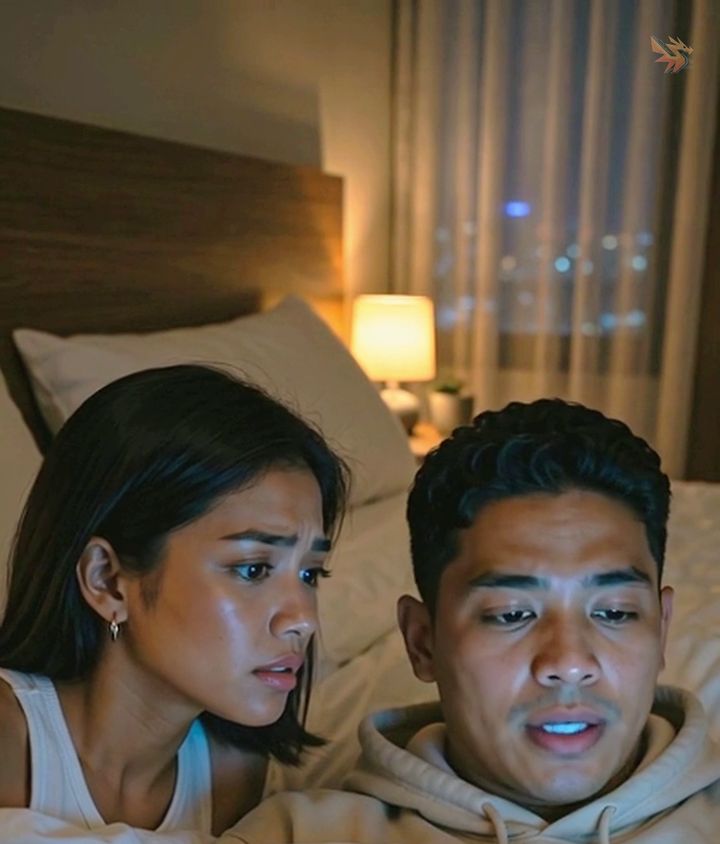
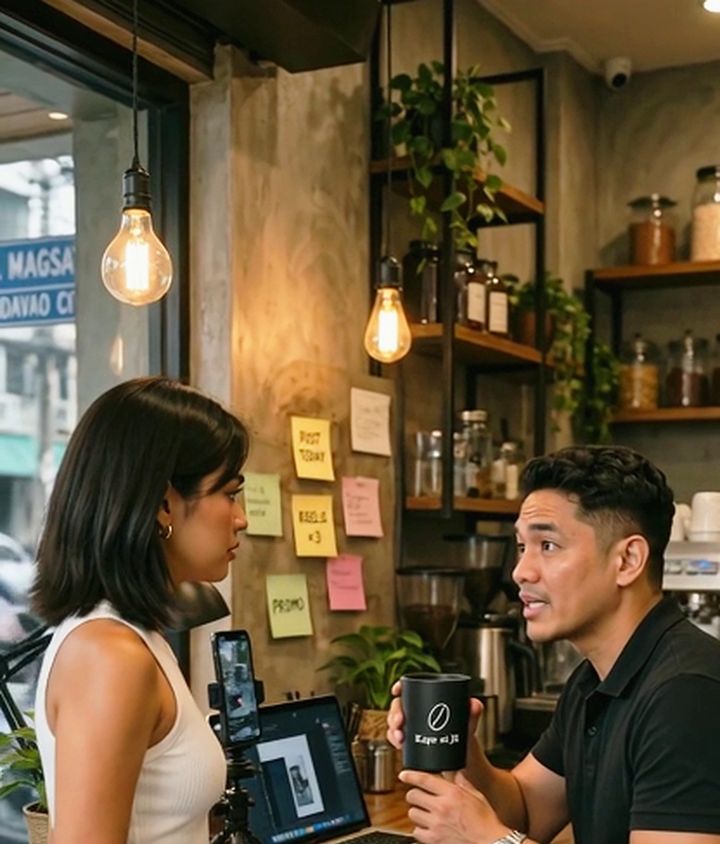
CZARINA, 26, Filipina, oval face with sculpted cheekbones and a clean jaw, large dark-brown eyes, shoulder-length straight dark hair, a small crescent scar near the right edge of her chin. Wears a white ribbed sleeveless top and small silver earrings. Medium shot, seated at a carinderia counter at golden hour, warm natural light, looking toward camera with a soft, confident smile.
Frequently asked questions
Does a consistent character AI video tool guarantee an identical face every time?
No tool can promise a pixel-identical face on every render — the render itself is still generative. Wiring one reference into every shot removes the biggest source of drift (a fresh guess from text alone), so treat it as consistent by design, not by guarantee.
Is there a free way to try consistent character AI video?
Yes — start a board free; building and wiring a board costs nothing, only rendering a shot spends credits.
Paano gumawa ng AI video na sunod-sunod ang mukha ng tauhan?
Gumawa ng isang cast card para sa karakter, i-wire ito sa bawat shot na kasama sila — huwag ulit-ulitin ang paglalarawan sa bawat prompt. Ganito gumagana ang Spaces board sa MarketDragon.
Can I keep a character consistent across image and video shots on the same board?
Yes — the wiring works the same way whether the shot downstream is an image node or a video node. Both read the same cast card reference.
Keep reading
Same shelfWhy You Should Generate The Image First, Then Animate It
Text-to-video gives you one roll of the dice on everything at once. Image-first splits it into two cheap decisions you can actually control.
Shot Sizes, And Why "Close-Up" Isn't Specific Enough
Wide, medium, close-up, extreme close-up. How much of the subject is in frame is the single most reliable control you have over an AI shot.
Veo 3.1 Fast vs Quality — Which One to Use
Same prompt limit, same aspect ratios, same seed control. Here is how Fast and Quality really differ, and when each one is worth it.