Half These Image Models Charge The Same For A Quarter Of The Pixels
Nano Banana Pro costs the same at 1K as at 2K. Flux and Seedream don't charge for resolution at all. Rendering small is often paying full price for less.

There's a habit almost everyone brings to image generation: render small while you're iterating, then render big once you're happy. It's sound reasoning and on roughly half the models available it saves you nothing at all.
Some models price by resolution. Some charge a flat rate whatever you ask for. If you're on a flat-rate model and rendering at 1K to be careful with budget, you are paying full price for a quarter of the pixels.
What each one actually costs
Credits for a single text-to-image generation, at each resolution the model offers.
| Model | 1K | 2K | 4K | Prompt cap | Ratios |
|---|---|---|---|---|---|
| z-image | 2 | 2 | 2 | 1,000 | 5 |
| Flux 2 Flex | 4 | 4 | — | 5,000 | 8 |
| GPT Image 2 | 6 | 10 | 16 | 20,000 | 16 |
| Seedream 4.5 | 6 | 6 | — | 3,000 | 8 |
| Flux 2 Pro | 8 | 8 | — | 5,000 | 8 |
| Nano Banana 2 | 8 | 12 | 18 | 20,000 | 15 |
| Imagen 4 | 10 | 10 | 10 | 5,000 | 5 |
| Nano Banana Pro | 18 | 18 | 24 | 10,000 | 11 |
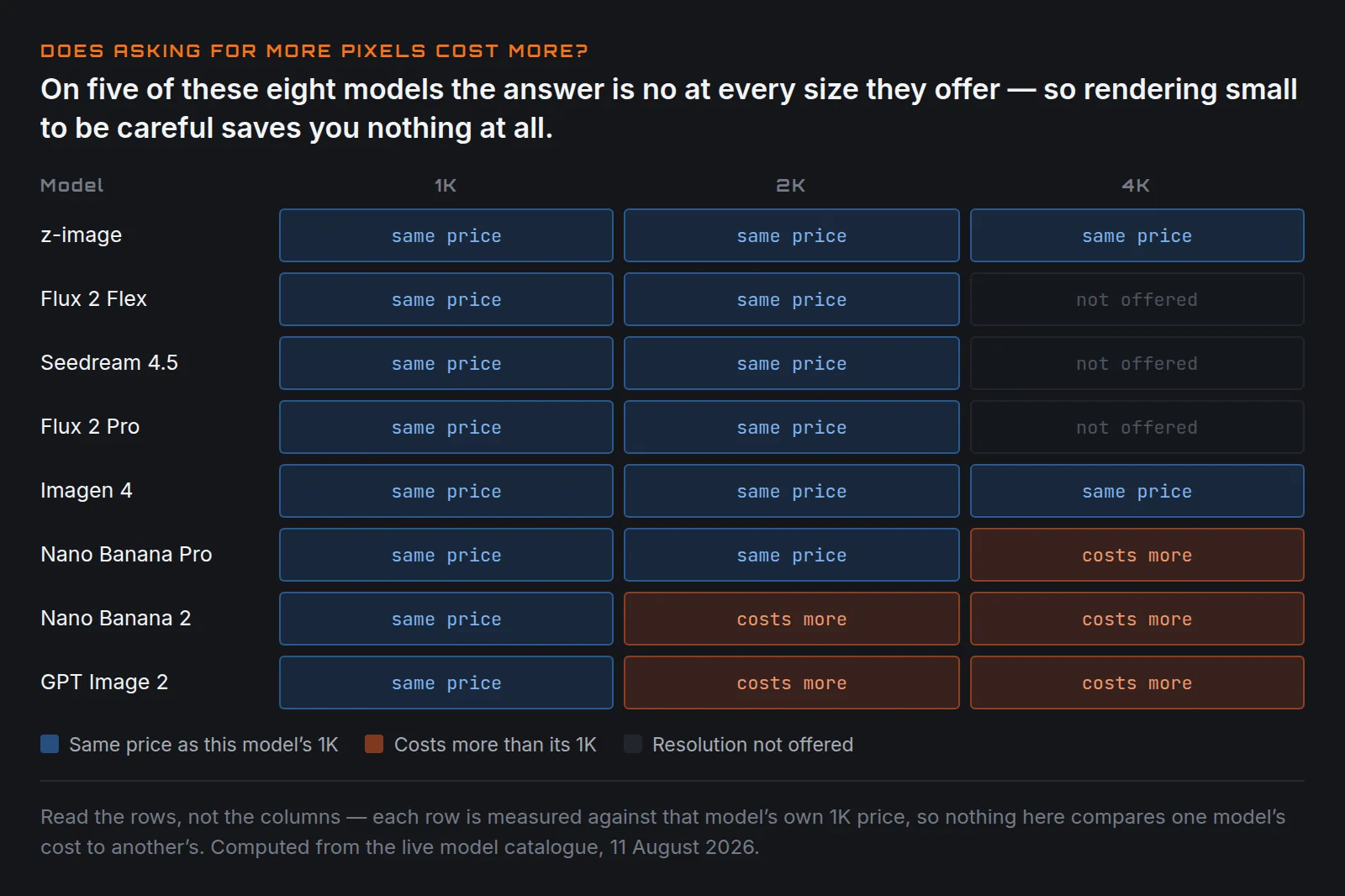
Flat-rate rows are the ones where the number doesn't move: z-image, Flux 2 Flex,
Flux 2 Pro, Seedream 4.5, Imagen 4. Flux caps at 2K; Seedream trades resolution
for a basic / high quality switch at the same price either way; Imagen and
z-image expose no resolution control at all.
Three things fall straight out of that table
Nano Banana Pro at 1K is money thrown away
18 credits at 1K. 18 credits at 2K. Identical price, four times the pixels.
There is no reason to ever generate a 1K image on Nano Banana Pro. If you have a pipeline defaulting to 1K — and 1K is the model's default — every image it has produced could have been 2K for free.
Nano Banana 2 beats Nano Banana Pro on paper, and costs less
At every resolution: 8 vs 18 at 1K, 12 vs 18 at 2K, 18 vs 24 at 4K. Cheaper throughout, and it also has double the prompt cap (20,000 vs 10,000), more reference image slots (14 vs 8), and more aspect ratios including extreme panoramas (8:1, 1:8, 4:1, 1:4) that nothing else here offers.
On specification alone there is no argument for Pro. Whether output quality justifies the premium is a different question and not one a table can answer — but it's worth being clear that the premium is what you'd be testing for, because nothing else about Pro is better.
GPT Image 2 is the cheapest way into the high end
6 credits at 1K, a 20,000-character prompt cap, and sixteen aspect ratios including 3:1, 1:3, 2:1 and 9:21. Nothing else here renders those natively.
If you need a wide banner or a tall skyscraper unit, this is the only model in the list that produces one without cropping. It's also a third the price of Nano Banana Pro at 1K.
So iterate on flat-rate, finalise wherever you like
The general advice — iterate cheap, finalise expensive — needs adjusting per model.
On resolution-priced models (GPT Image 2, Nano Banana 2, and Nano Banana Pro at 4K) the advice holds. Explore at 1K, render the keeper at 2K or 4K.
On flat-rate models (Flux, Seedream, Imagen, z-image) there's no reason to ever render below maximum. Set it high and leave it there.
On Nano Banana Pro specifically, set 2K as your floor and treat 4K as the only real upgrade decision.
A cheap habit worth adopting: do concept exploration on z-image at 2 credits or Flux 2 Flex at 4, then move the prompt that worked to whichever model you're finishing on. Nine exploratory renders on z-image cost the same as one on Nano Banana Pro.
Editing is a separate endpoint, and usually cheaper
Reaching for a text-to-image model to reproduce an existing image with one thing changed is the expensive way round. Most of these have a dedicated edit path:
| Edit model | Cost | Input images | Prompt cap |
|---|---|---|---|
| Nano Banana Edit | 4 | 10 | 5,000 |
| Seedream 4.5 Edit | 6 | — | 3,000 |
| GPT Image 2 Edit | 6 / 10 / 16 | 16 | 20,000 |
Nano Banana Edit at a flat 4 credits taking ten input images is the cheapest way to make a targeted change. GPT Image 2 Edit accepts sixteen inputs, the most of anything here, which matters for composite work.
What this comparison deliberately doesn't tell you
Nothing above is about output. Cost and parameters are knowable from configuration; quality is not, and the differences that matter most in practice can't be inferred from a spec sheet:
- Prompt adherence — whether you get what you asked for
- Text rendering — legible type inside an image, still the biggest practical differentiator between these models
- Hands and faces — still the standard failure surface
- Style range — whether flat illustration is as strong as photoreal
Those need the same prompt run across all of them and judged side by side. Until that's done, treat this as what it is: a cost and capability map, not a recommendation.
The one thing you can act on today without any testing is the pricing. If you're rendering 1K on Nano Banana Pro, stop.
Costs are user-facing credits for a single generation, computed from the live rate configuration on 11 August 2026. Providers revise rates without notice.
Keep reading
Same shelfShot Sizes, And Why "Close-Up" Isn't Specific Enough
Wide, medium, close-up, extreme close-up. How much of the subject is in frame is the single most reliable control you have over an AI shot.
The Anatomy Of A Prompt That Still Works Next Quarter
Subject, action, setting, camera, light, style. Six slots. Fill them in that order and most of what people call prompt engineering disappears.
Veo 3.1 Fast vs Quality — Which One to Use
Same prompt limit, same aspect ratios, same seed control. Here is how Fast and Quality really differ, and when each one is worth it.