Camera Movement In Video Prompts: One Move Per Shot
Push in, pan, tilt, orbit, handheld. Naming the move is easy — the hard part is resisting the urge to ask for three of them at once.

Camera movement is the control that separates a video prompt from an animated still. It's also where most video prompts fall apart, and almost always for the same reason: they ask for more motion than the shot has time to perform.
The moves
Push in / dolly in — the camera physically moves toward the subject. Space compresses, the subject grows, the viewer is drawn in. The single most useful move in commercial video.
camera slowly pushes in toward the subject
Pull out / dolly out — the reverse. Reveals context, releases tension, reads as an ending.
camera slowly pulls back to reveal the full room
Pan — the camera stays put and rotates horizontally. Like turning your head.
camera pans left to right across the storefront
Tilt — the camera stays put and rotates vertically. Like nodding.
camera tilts up from the shoes to the face
Orbit / arc — the camera travels around the subject, keeping it centred. Shows an object in three dimensions. The product-shot move.
camera orbits slowly around the subject, subject stays centred
Tracking / follow — the camera moves alongside a moving subject, holding the frame on them.
camera tracks alongside her as she walks, holding her in frame
Handheld — not a direction but a texture. Small constant instability. Reads as documentary, urgency, realism.
handheld camera, subtle natural shake
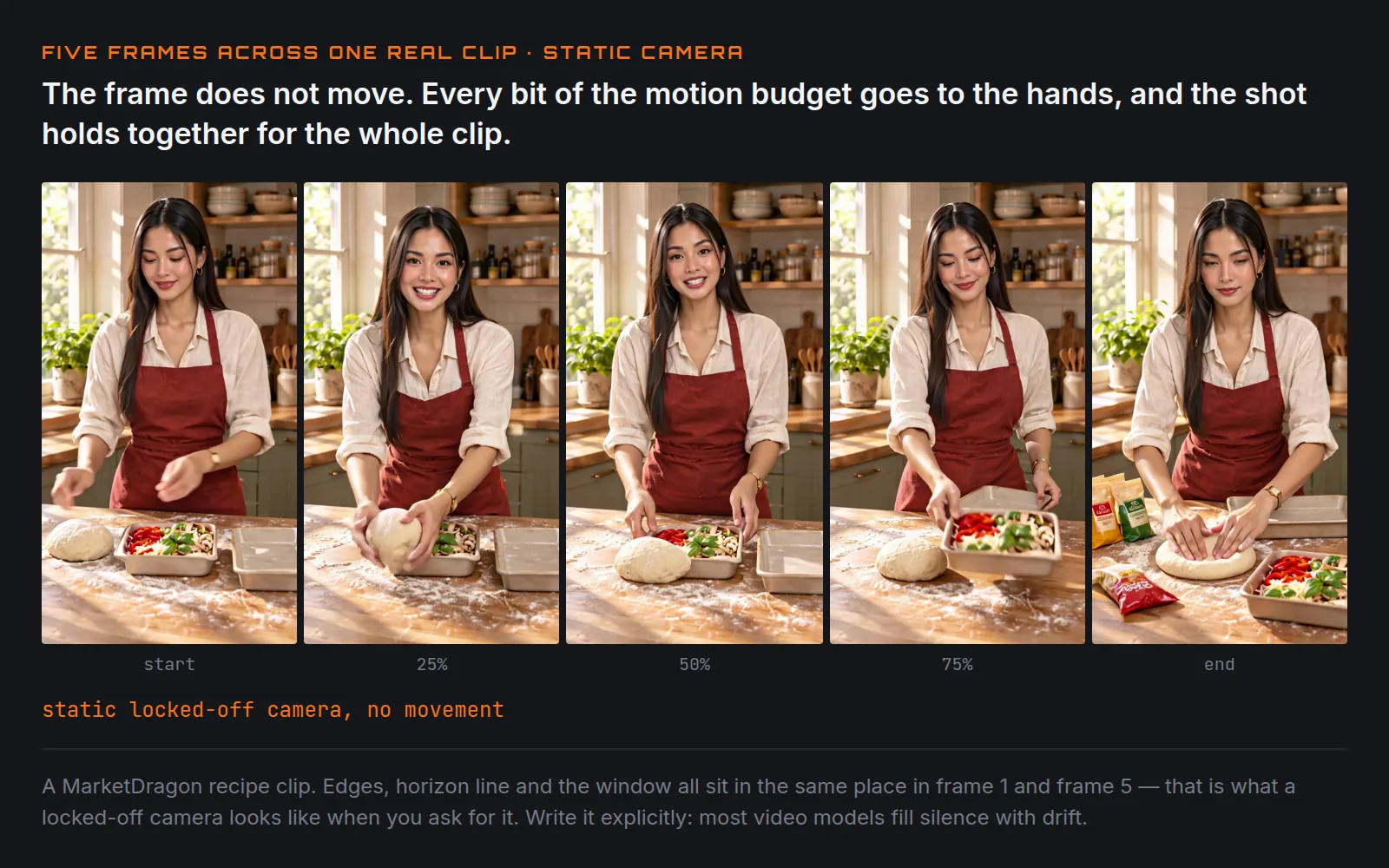
Static / locked off — no movement at all. Worth writing explicitly, because most video models will invent drift if you don't.
static locked-off camera, no movement
Zoom is not push in
They look different and people ask for the wrong one constantly.
A push in moves the camera through space. The background relationship changes — things behind the subject shift position relative to it. It feels like walking toward someone.
A zoom changes the lens focal length from a fixed position. Nothing moves; the image just magnifies. Background compresses flat. It feels like looking harder, not moving closer, and it carries a slightly cheap, televisual quality that is occasionally exactly what you want.
If you write "zoom in" and get a dolly, or vice versa, that's the distinction to reach for:
dolly in — camera physically moves closer, not a lens zoom
One move per shot
This is the rule that matters most, and it's the one most prompts break.
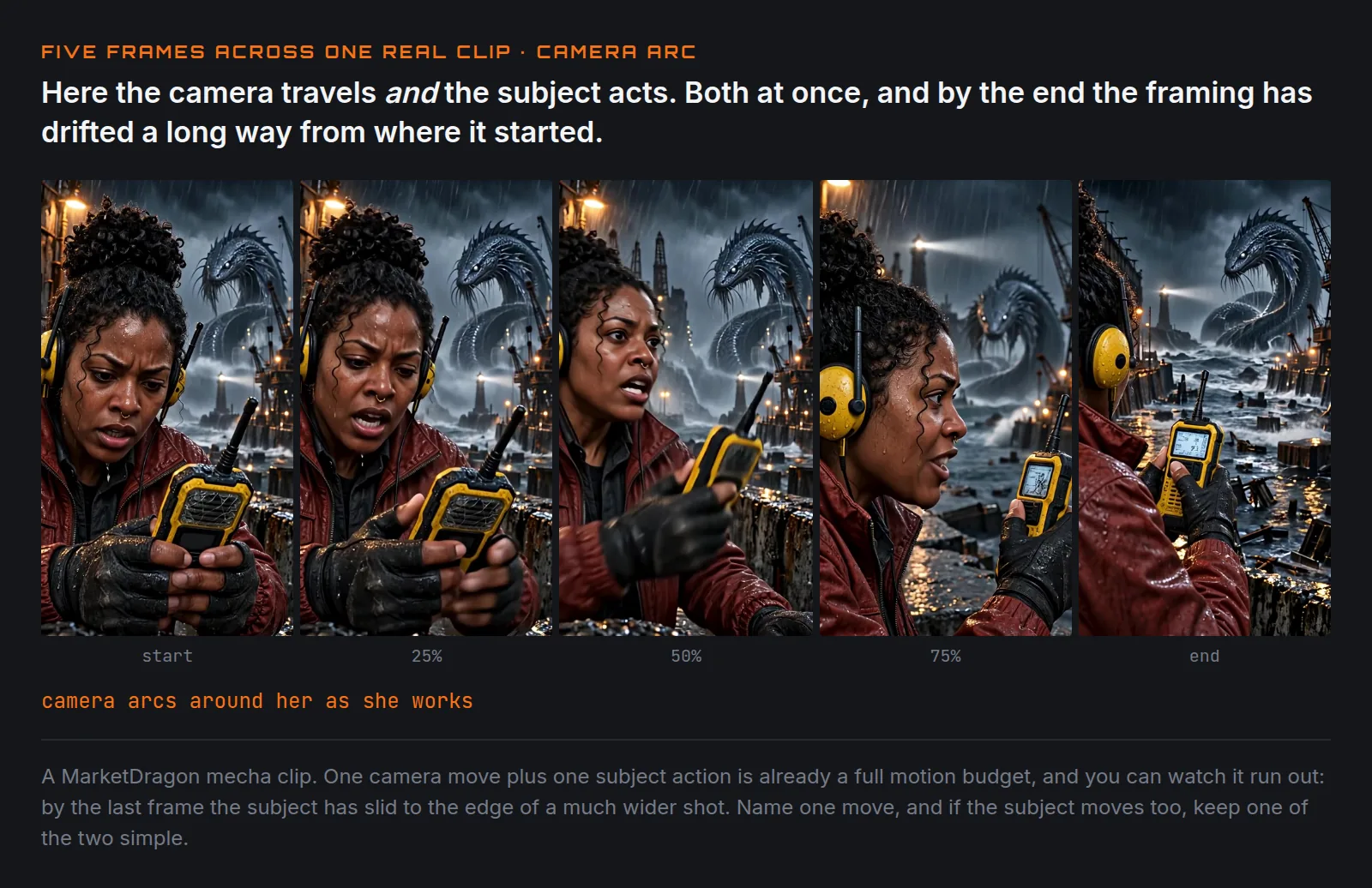
A five-second clip has time for one camera move to begin, happen, and settle. Asking for two means neither completes. Asking for three produces something that looks like a mistake.
Fails:
The camera pans across the kitchen, then pushes in on the chef, then tilts up to the hanging pans as he looks toward the window.
That is three moves and a subject action in five seconds. What comes back is usually a smear — the model attempts a blend of all three, or picks one and silently drops the rest.
Works:
Static wide shot of the kitchen. The chef turns toward the window.
Or, if you want the movement:
Camera slowly pushes in on the chef. He does not move.
Notice the second one gives the subject nothing to do. That's deliberate. In a short clip, motion budget is shared between the camera and the subject. If both are doing something complicated, both will be done badly. Pick which one carries the shot.
Give the move a speed
"Camera pushes in" leaves the rate unspecified, and the default tends toward faster than you want. Speed words are cheap and they land:
slowly,gradually,almost imperceptiblysteadilyquickly,rapidly,whip pan
camera pushes in very slowly over the course of the shot
"Over the course of the shot" is a useful phrase on its own — it tells the model the move should span the full duration rather than finishing in the first second and sitting still.
Movement and duration are linked
Longer clips can hold more movement, but not proportionally more. A ten-second shot doesn't fit two moves comfortably; it fits one slower move, or one move plus a settle.
If your prompt keeps producing rushed camera work, the fix is usually a longer duration rather than a slower-sounding adjective — the model is compressing the move you asked for into the time it was given.
Writing the whole shot
Movement is the last of the four camera controls, and it reads best at the end of the camera clause, after size and angle have established the starting frame:
Medium shot, slightly low angle, camera pushes in slowly over the shot. A welder lowers his mask in a dim workshop, sparks catching the lens.
Start position, then what changes. In that order, it's unambiguous. Reversed or tangled together, it isn't.
The short version
Name one move. Give it a speed. Say whether the subject also moves, and if the
answer is yes, make one of the two simple. And write static, no camera movement
when you mean it — silence is not the same as an instruction, and most video
models fill silence with drift.
Keep reading
Same shelfShot Sizes, And Why "Close-Up" Isn't Specific Enough
Wide, medium, close-up, extreme close-up. How much of the subject is in frame is the single most reliable control you have over an AI shot.
Camera Angles That Change What A Shot Means
Eye level, low angle, high angle, Dutch. Four words that change the meaning of a shot more than any adjective you could add.
Lighting Is The Half Of The Prompt Everyone Skips
Direction, quality, colour. Three decisions that do more for how an image reads than any adjective about mood.